What if I told you that selecting the wrong cloud hosting platform for your enterprise Drupal ecosystem could burn over $50,000 annually in wasted developer hours, unnecessary add-on licenses, and architectural workarounds? Or that choosing an overly complex Infrastructure-as-Code platform for a simple personal blog might turn a weekend site launch into a two-week DevOps nightmare?
Have you ever found yourself locked in a heated architecture meeting debating whether your team needs opinionated WebOps governance or unconstrained Infrastructure-as-Code (IaC) flexibility? Or watched a deployment stall because your staging environment did not match your production container topology? If so, you are grappling with one of the most fundamental decisions in modern web engineering: Pantheon vs. Platform.sh.
As of 2026, Drupal 10 and Drupal 11 have matured into powerful, decoupled, AI-integrated content platforms. But the infrastructure underneath them has evolved just as rapidly. Pantheon has expanded its Global Edge Fabric, broadened custom upstreams, and refined its opinionated WebOps platform. Meanwhile, Platform.sh (now operating alongside Upsun) has pushed the boundaries of Git-driven infrastructure, polyglot microservice hosting, and granular resource scaling.
I have architected, deployed, and managed dozens of high-traffic enterprise Drupal portals, multi-tenant university platforms, and personal projects on both platforms over the past decade. This is not a high-level marketing overview. This is a deep technical breakdown comparing container architectures, deployment pipelines, configuration schemas, developer experience, enterprise compliance, and real-world costs.
Why Should You Care?
Your hosting platform is not just where your PHP code resides — it dictates your team’s operational velocity, security posture, and financial budget:
- Deployment Reliability — Does branching create instantaneous, isolated test environments, or are you limited to fixed staging slots?
- Architectural Constraints — Can you run custom background workers, Node.js microservices, RabbitMQ, and vector search engines, or are you restricted to PHP, MariaDB, and Redis?
- Developer Onboarding — Can a new developer spin up a local instance synced with cloud data in 5 minutes, or does it require manual credential management?
- Total Cost of Ownership (TCO) — Are you paying for rigid, tiered resource buckets, or pay-as-you-go CPU and RAM consumption?
- Enterprise Compliance — Do you need turnkey SOC2 Type II, HIPAA BAA, and FedRAMP compliance out of the box, or are you willing to configure compliance layers yourself?
Whether you are managing a portfolio of 500 enterprise sites for a global brand or launching a personal technical portfolio, understanding the structural trade-offs between Pantheon and Platform.sh is critical.
Part 1: Architectural Foundations — WebOps PaaS vs. Infrastructure-as-Code PaaS
To understand why these platforms behave so differently, we must examine their underlying architectural philosophy.
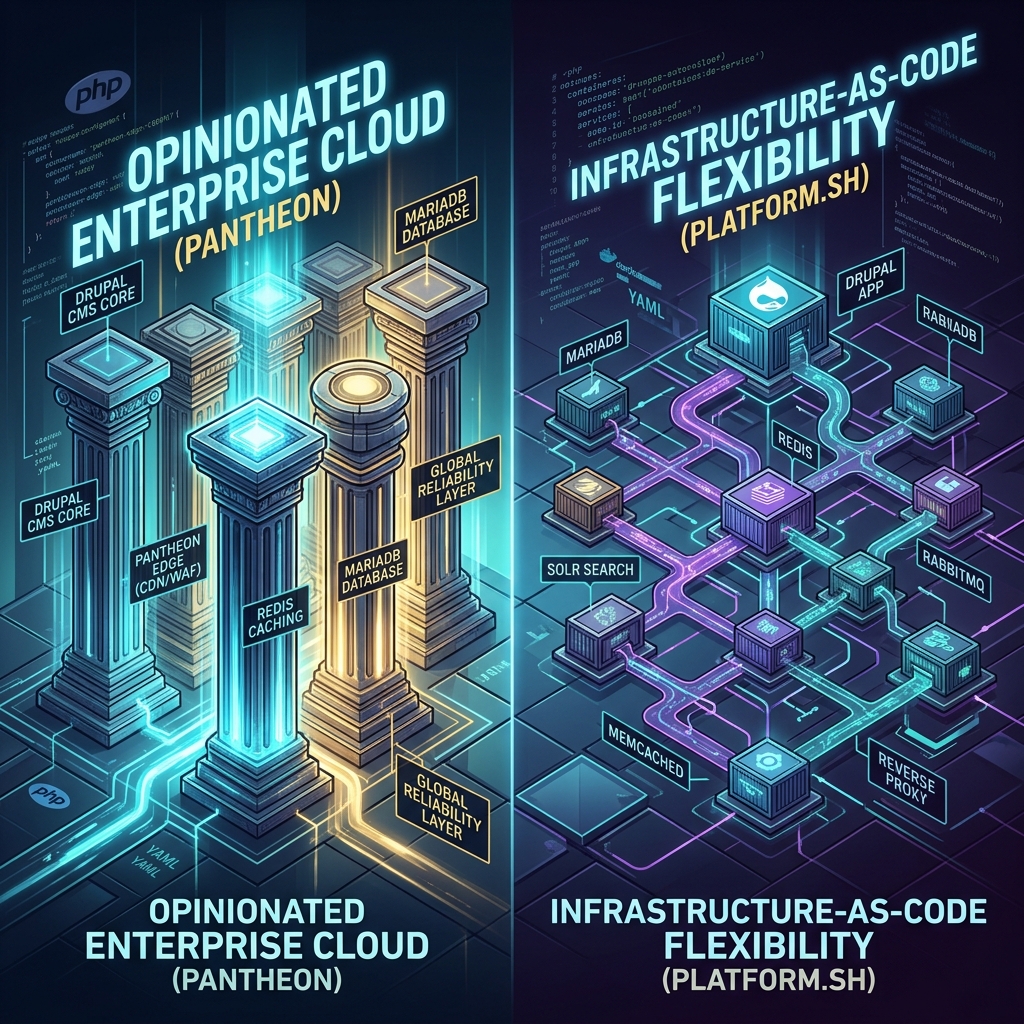
Pantheon: The Opinionated WebOps Engine
Pantheon was founded on a core belief: Web development teams spend too much time managing infrastructure infrastructure and not enough time shipping features.
To solve this, Pantheon built an opinionated, standardized container platform tailored specifically for PHP CMS architectures (Drupal and WordPress). On Pantheon:
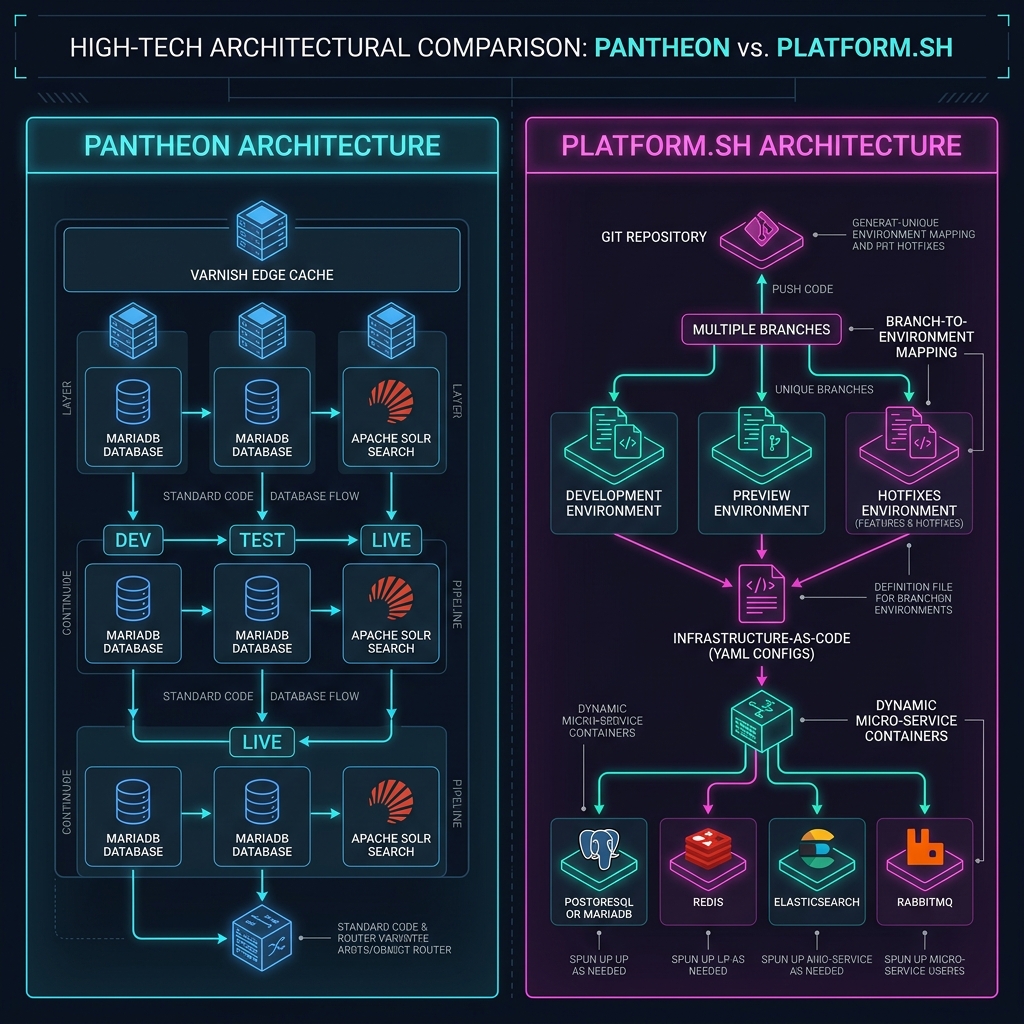
- Standardized Container Topology: Every site runs on a highly optimized stack consisting of Nginx, PHP-FPM, MariaDB (Galera cluster on enterprise tiers), Redis for caching, and Apache Solr for search.
- Fixed Environment Lifecycle: By default, sites follow a strict Dev -> Test -> Live pipeline, supplemented by Multidev feature environments.
- Global Edge Fabric: Integrated CDN, Web Application Firewall (WAF), and DDoS protection powered by Fastly are baked directly into the edge layer.
- Custom Upstreams: Enterprise organizations can maintain a central core codebase (a “Custom Upstream”) and push one-click updates to hundreds of downstream sites simultaneously.
Pantheon abstracts away server configuration. You cannot edit Nginx configuration files, install custom C extensions, or spin up arbitrary background daemons. In exchange, Pantheon guarantees that your environment is tuned, secure, and maintained without server administration overhead.
Platform.sh: The Infrastructure-as-Code Polyglot
Platform.sh took the opposite approach: Infrastructure should be defined entirely as version-controlled code.
Rather than providing a pre-configured PHP container with fixed sidecars, Platform.sh treats your Git repository as the blueprint for your entire cloud topology.
- Declarative YAML Specs: You define your application runtime (
.platform.app.yaml), services like databases and queues (.platform/services.yaml), and edge routing (.platform/routes.yaml) inside your codebase. - Dynamic Container Mesh: Platform.sh provisions isolated, immutable LXC/Docker containers for every component defined in your YAML files.
- Polyglot & Multi-Service Native: A single Drupal application can seamlessly connect to a Node.js SSR frontend, Python AI worker, PostgreSQL database, Redis cache, Elasticsearch cluster, and RabbitMQ message broker on the same infrastructure.
- Grid-Based Ephemeral Environments: Every Git branch and pull request can trigger an exact, byte-for-byte copy of your production infrastructure and data in minutes.
Platform.sh grants developers complete freedom over infrastructure topology, PHP extensions, build steps, and service versions.
Core Architecture Comparison
The following table summarizes the fundamental infrastructure differences between the two platforms:
| Architectural Dimension | Pantheon | Platform.sh |
|---|---|---|
| Primary Philosophy | Opinionated WebOps & Governance | Infrastructure-as-Code (IaC) & Flexibility |
| Container Engine | Proprietary container engine (Containers on GCP/AWS) | LXC / Immutable container grid |
| Configuration Model | Dashboard UI + pantheon.yml / Quicksilver | Git-committed .platform.app.yaml, services.yaml, routes.yaml |
| Supported Runtimes | PHP (Drupal, WordPress, Decoupled Node.js via Front-End Sites) | PHP, Node.js, Python, Ruby, Go, Java, Rust |
| Database Engines | MariaDB / MySQL (Galera cluster for HA) | MariaDB, MySQL, PostgreSQL, Oracle MySQL, MongoDB |
| Search & Indexing | Apache Solr (Managed Pantheon Solr service) | Apache Solr, Elasticsearch, OpenSearch |
| Auxiliary Services | Redis (Object Cache), Varnish/Fastly CDN | Redis, Memcached, RabbitMQ, Kafka, InfluxDB, Solr, Elasticsearch |
| Edge & CDN | Pantheon Global Edge (Fastly-powered WAF/CDN included) | Integrated Fastly / Cloudflare / Custom edge routing |
Part 2: Branching, Environment Management, & CI/CD Dynamics
One of the sharpest contrasts between Pantheon and Platform.sh lies in how developers create feature environments, test code, and execute deployments.
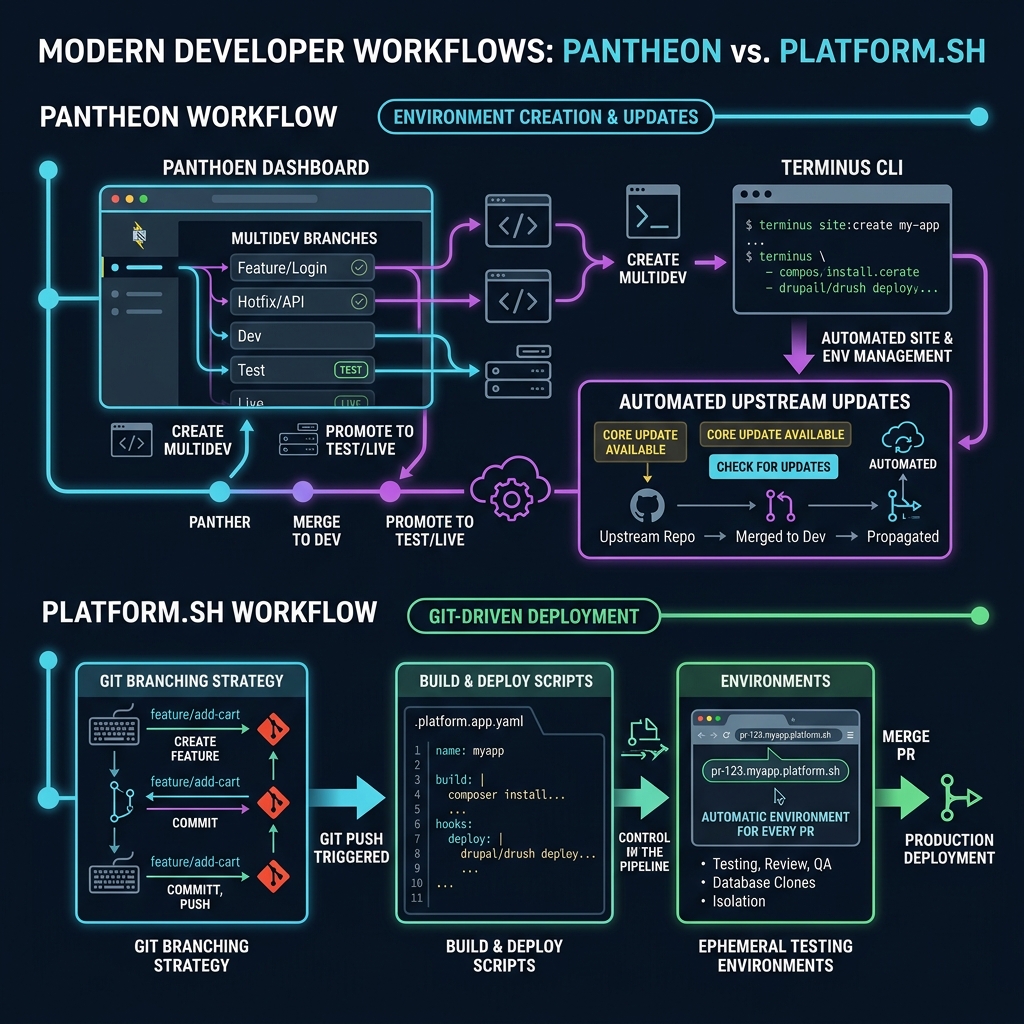
Pantheon’s Workflow: Web UI & Multidev
Pantheon enforces a structured Dev -> Test -> Live pipeline.
- Dev Environment: Receives code commits pushed to the main Git repository.
- Test Environment: Mirrors Live configuration and data for staging release candidates.
- Live Environment: Highly available production cluster with strict write permissions.
For feature development, Pantheon offers Multidev. A Multidev environment creates an isolated cloud instance (with its own URL, database copy, and file storage) mapped to a Git branch.
Multidev Characteristics & Workflow:
- Creation: Triggered via the Pantheon Dashboard UI or the
terminusCLI tool (terminus multidev:create). - Limit: Standard accounts receive up to 10 Multidevs; Enterprise plans can scale higher.
- Data Sync: Databases and user files can be cloned down from Live or Dev into the Multidev via UI or CLI.
- Code Merging: When feature testing completes, code is merged back into
master/main, which deploys to theDevenvironment, then promoted toTest, and finally toLive.
While Multidev is intuitive for non-technical site builders, it relies heavily on Pantheon’s management API rather than being purely driven by raw Git events.
Platform.sh Workflow: Pure Git-Driven Ephemeral Environments
Platform.sh operates on a pure Git-as-Source-of-Truth model. There is no concept of a separate “Multidev” command.
How Ephemeral Environments Work on Platform.sh:
- Branching as Provisioning: When a developer creates a Git branch (
git checkout -b feature/search-upgrade) and pushes it to Platform.sh (git push platform feature/search-upgrade), Platform.sh automatically provisions a complete, isolated environment for that branch. - Instant Data Inheritance: By default, child environments clone the production database and file storage using copy-on-write filesystem snapshots (taking seconds, regardless of database size).
- Pull Request Automation: When integrated with GitHub, GitLab, or Bitbucket, opening a Pull Request instantly spins up an environment, posts the preview URL into the PR thread, and tears down the environment when the PR is merged or closed.
- Hierarchical Branching: You can branch off branches (e.g.,
main->sprint-1->feature-A), creating parent-child environment trees with cascading configuration inheritance.
CI/CD Comparison Matrix
| CI/CD & Branching Feature | Pantheon | Platform.sh |
|---|---|---|
| Environment Trigger | Dashboard UI or terminus CLI command | Native git push on any branch or Pull Request |
| Max Concurrent Environments | Fixed quota based on plan (5 to 20+ Multidevs) | Dynamic / Unlimited branches (based on account plan limit) |
| Database Cloning Speed | Standard database dump & restore (minutes to hours for large DBs) | Instant copy-on-write storage snapshot (seconds) |
| Build Hook Automation | Quicksilver hooks (pantheon.upstream.yml script triggers) | Native .platform.app.yaml build, deploy, and post_deploy hooks |
| Environment Teardown | Manual deletion via Dashboard or Terminus script | Automatic on git branch -d or PR closure |
| Decoupled / Multi-App Support | Front-End Sites (Node.js/Next.js paired with Drupal) | Multi-application single-repository (.platform.app.yaml per app) |
Part 3: Configuration, Code, & Scripting Showdown
Let us get under the hood and look at actual configuration files, database setup snippets, and deployment automation scripts for both platforms.
1. Infrastructure Definition: pantheon.yml vs. .platform.app.yaml
Pantheon Configuration (pantheon.yml)
Pantheon keeps site configuration concise because server details are standardized:
# pantheon.yml -- Standard Pantheon Configuration
name: my-drupal-enterprise-site
pantheon_version: 1
php_version: 8.3

# Enable Redis Object Cache
redis:
  status: enabled

# Configure Nested Docroot (Drupal 10/11 standard)
web_docroot: true

# Solr Search Indexing Version
database:
  version: 10.11

# Quicksilver Deployment Automation Triggers
api_version: 1
To run post-deployment tasks (like running database updates or clearing cache), Pantheon uses Quicksilver hooks declared in pantheon.upstream.yml or pantheon.yml:
# Quicksilver hook inside pantheon.yml
workflows:
  deploy:
    after:
      - script: private/scripts/quicksilver/drush_deploy.php
        description: Run Drush Deploy after code deployment
Platform.sh Configuration (.platform.app.yaml + .platform/services.yaml)
Platform.sh requires explicit infrastructure definition in code:
# .platform.app.yaml -- Platform.sh Application Blueprint
name: drupal
type: php:8.3
size: AUTO

relationships:
  database: "db:maria"
  redis: "cache:redis"
  solr: "search:solr"

web:
  locations:
    "/":
      root: "web"
      passthru: "/index.php"

disk: 4096

mounts:
  "/web/sites/default/files":
    source: service
    service: files
  "/tmp":
    source: local
    source_path: tmp
  "/private":
    source: service
    service: private

hooks:
  build: |
    set -e
    composer install --no-dev --prefer-dist --optimize-autoloader
  deploy: |
    set -e
    cd web
    ../vendor/bin/drush deploy -y
Alongside the application YAML, Platform.sh requires .platform/services.yaml to define service containers:
# .platform/services.yaml -- Services Definition
db:
  type: mariadb:10.11
  disk: 10240

cache:
  type: redis:7.2

search:
  type: solr:9.4
  disk: 4096
  configuration:
    cores:
      drupal: "solr/configsets/drupal"
2. Environment Variables & settings.php Integration
Pantheon settings.php Snippet
Pantheon automatically injects database and service credentials into global environment variables ($_ENV['PANTHEON_ENVIRONMENT']):
<?php
// web/sites/default/settings.php -- Pantheon Environment Integration

if (defined('PANTHEON_ENVIRONMENT')) {
  // Database Connection Configuration
  $databases['default']['default'] = array(
    'driver' => 'mysql',
    'database' => $_ENV['DB_NAME'],
    'username' => $_ENV['DB_USER'],
    'password' => $_ENV['DB_PASSWORD'],
    'host' => $_ENV['DB_HOST'],
    'port' => $_ENV['DB_PORT'],
    'prefix' => '',
  );

  // Redis Cache Integration
  if (in_array($_ENV['PANTHEON_ENVIRONMENT'], ['dev', 'test', 'live']) || !empty($_ENV['FRAMEWORK'])) {
    $settings['redis.connection']['interface'] = 'PhpRedis';
    $settings['redis.connection']['host'] = $_ENV['CACHE_HOST'];
    $settings['redis.connection']['port'] = $_ENV['CACHE_PORT'];
    $settings['cache']['default'] = 'cache.backend.redis';
  }

  // Hash Salt & Private Directory
  $settings['hash_salt'] = $_ENV['DRUPAL_HASH_SALT'];
  $settings['file_private_path'] = 'sites/default/files/private';
}
Platform.sh settings.php Snippet
Platform.sh provides an official PHP configuration library (platformsh/config-reader) to decode base64-encoded environment JSON objects:
<?php
// web/sites/default/settings.php -- Platform.sh Environment Integration
use Platformsh\ConfigReader\Config;

$platformconfig = new Config();

if ($platformconfig->isAvailable()) {
  // Configure Database Relationships
  if ($platformconfig->hasRelationship('database')) {
    $endpoint = $platformconfig->credentials('database');
    $databases['default']['default'] = array(
      'driver' => $endpoint['scheme'],
      'database' => $endpoint['path'],
      'username' => $endpoint['username'],
      'password' => $endpoint['password'],
      'host' => $endpoint['host'],
      'port' => $endpoint['port'],
    );
  }

  // Configure Redis Relationship
  if ($platformconfig->hasRelationship('redis')) {
    $redis_endpoint = $platformconfig->credentials('redis');
    $settings['redis.connection']['host'] = $redis_endpoint['host'];
    $settings['redis.connection']['port'] = $redis_endpoint['port'];
    $settings['cache']['default'] = 'cache.backend.redis';
  }

  // File Paths & Hash Salt
  $settings['hash_salt'] = $platformconfig->projectSecret;
  $settings['file_private_path'] = $platformconfig->appDir . '/private';
}
3. CLI Automation & Scripting: terminus vs. platform
Both platforms feature powerful CLI tools that form the backbone of automated deployment scripts and local tooling.
Pantheon CLI (terminus) Automation Script
#!/usr/bin/env bash
# Deploy feature branch on Pantheon using Terminus
SITE_NAME="my-drupal-enterprise"
ENV_NAME="feat-checkout"

echo "🚀 Creating Multidev environment ${ENV_NAME}..."
terminus multidev:create ${SITE_NAME}.live ${ENV_NAME}

echo "🔄 Syncing database from Live to ${ENV_NAME}..."
terminus env:clonedb ${SITE_NAME}.live ${ENV_NAME}

echo "🧹 Executing Drush Deploy..."
terminus remote:drush ${SITE_NAME}.${ENV_NAME} -- deploy -y

echo "✅ Multidev URL:"
terminus env:info ${SITE_NAME}.${ENV_NAME} --field=domain
Platform.sh CLI (platform) Automation Script
#!/usr/bin/env bash
# Environment management using Platform.sh CLI
PROJECT_ID="abc123xyz"
BRANCH_NAME="feature/checkout-upgrade"

echo "🚀 Checkout and push branch to trigger cloud build..."
git checkout -b ${BRANCH_NAME}
git push platform ${BRANCH_NAME}

echo "⏳ Waiting for environment deployment to complete..."
platform environment:wait --project=${PROJECT_ID} --environment=${BRANCH_NAME}

echo "🧹 Running database updates..."
platform ssh --environment=${BRANCH_NAME} "drush deploy -y"

echo "✅ Environment URL:"
platform url --environment=${BRANCH_NAME} --primary --pipe
4. Local Development Integration: Lando vs. DDEV
Both Pantheon and Platform.sh integrate seamlessly with modern containerized local development tools (Lando and DDEV).
Pantheon Local Config Examples
# .lando.yml -- Lando recipe for Pantheon
name: my-pantheon-site
recipe: pantheon
config:
  framework: drupal10
  site: my-drupal-enterprise
  id: 12345678-abcd-efgh-1234-56789abcdefg
# .ddev/config.pantheon.yaml -- DDEV integration for Pantheon
# Driven by ddev-pull command using Terminus
# Run: ddev config --project-type=drupal10
# Run: ddev pull pantheonPlatform.sh Local Config Examples
# .lando.yml -- Lando recipe for Platform.sh
name: my-platform-site
recipe: platformsh
config:
  id: abc123xyz
# .ddev/providers/platform.yaml -- DDEV provider for Platform.sh
# Uses the native 'ddev pull platform' command to sync DB and files directly
# based on .platform.app.yaml and .platform/services.yaml definitions5. Multi-Container Services vs. Add-ons
Here is where the architectural split becomes stark:
# Platform.sh multi-container definition: Running RabbitMQ alongside Drupal
# Added directly to .platform/services.yaml with zero support ticket required!
queue:
  type: rabbitmq:3.12
  disk: 2048
On Pantheon, you cannot add arbitrary containers like RabbitMQ or Elasticsearch yourself. You rely on Pantheon-managed add-ons (Solr, Redis) or connect to external SaaS services (e.g., Cloud AMQP, AWS OpenSearch) via API keys.
On Platform.sh, adding RabbitMQ, Elasticsearch, or a Python worker requires only editing your Git-committed .platform/services.yaml file.
Part 4: Enterprise Scale, Security, Compliance, & Performance
When evaluating platforms for large enterprise organizations — such as Fortune 500 corporations, government entities, and large universities — security, compliance, high availability (HA), and multi-site governance take center stage.
High Availability & Infrastructure Resilience
Pantheon Enterprise Architecture
Pantheon’s Enterprise plans run on multi-zone high availability container clusters:
- Application Layer: Load-balanced PHP containers distributed across multiple Availability Zones (AZs).
- Database Layer: MariaDB Galera multi-master active-active database cluster. If an AZ fails, database failover occurs in seconds with zero data loss.
- Edge Layer: Global Edge fabric with Fastly CDN, DDoS mitigation, and enterprise WAF rules.
- Storage Layer: Distributed GlusterFS / cloud file storage system.
Platform.sh Enterprise (Grid / High Availability) Architecture
Platform.sh Enterprise deploys a triple-redundant cluster:
- Three-Node Topology: Every environment is deployed across three separate physical hosts in different AZs.
- Database Layer: MariaDB/PostgreSQL with synchronous replication across 3 nodes (1 primary, 2 hot standbys).
- Service Containers: Redis, Solr, and Elasticsearch are replicated across nodes.
- Self-Healing Storage: Block storage with real-time replication across infrastructure zones.
Security & Compliance Certifications
Enterprise procurement teams require rigorous compliance validations:
| Compliance / Governance Dimension | Pantheon | Platform.sh |
|---|---|---|
| SOC 2 Certification | SOC 2 Type II Certified | SOC 2 Type II Certified |
| ISO Certifications | ISO 27001 | ISO 27001 |
| HIPAA Compliance | Available (HIPAA BAA offered on Enterprise plans) | Available (HIPAA BAA on dedicated enterprise instances) |
| PCI-DSS Compliance | Merchant Level 1 compliant infrastructure | PCI-DSS compliant infrastructure available |
| GDPR / EU Data Sovereignty | US & EU data centers (GCP/AWS regions) | US, EU, UK, Canada, Australia (Multi-cloud: AWS, GCP, Azure, OVHcloud) |
| FedRAMP | FedRAMP Authorized (Pantheon Enterprise Gov Cloud) | Available via dedicated compliance configurations |
Enterprise Multi-Site Governance: Custom Upstreams vs. Platform.sh Fleet Management
Pantheon Custom Upstreams
Pantheon dominates higher education and multi-site enterprise governance with Custom Upstreams:
- A central organization creates a master GitHub/GitLab repository containing core Drupal, enterprise modules, security policies, and brand themes.
- Sub-organizations (e.g., 200 university departments or 50 global brand sites) spin up sites based on this Custom Upstream.
- When the central team releases a core update or security patch, site administrators receive a one-click update notification in their Pantheon dashboard.
- Updates can be automatically tested across all 200 sites via Terminus scripts and visual regression testing.
Platform.sh Fleet Management & Organization Rules
Platform.sh manages large site portfolios using Fleet Management and API automation:
- Shared templates can be propagated across projects using Git submodules, GitHub Actions, or Platform.sh CLI scripts.
- Projects can be organized into granular Organization units with strict Role-Based Access Control (RBAC).
- Updates are pushed across fleets via automated CI/CD pipelines (e.g., RenovateBot or custom GitHub Actions triggering
platformbuilds).
Part 5: Individual, SMB, & Developer Experience
While enterprise features are critical for large organizations, freelancers, agencies, and individual site owners evaluate platforms on very different parameters: pricing structure, setup ease, developer learning curve, and local sync workflow.
The Small Site & Individual Developer Reality
Pantheon for Small / Personal Sites
- Free Sandbox Sites: Pantheon allows developers to create unlimited free Sandbox sites for development and testing. You only start paying when you attach a custom domain and go live.
- Standard Plans: Entry-level “Basic” and “Performance” plans offer flat monthly pricing (ranging from ~$35/mo to ~$150/mo depending on traffic and resource tier).
- Ease of Use: Non-technical clients can log into the Pantheon Dashboard, clear caches, create backup snapshots, and review visual logs without touching a terminal.
- Trade-off for Small Sites: Flat monthly pricing can feel rigid if your site receives minimal traffic, and custom PHP modules/extensions cannot be installed.
Platform.sh for Small / Personal Sites
- Development Pricing: Flexible developer pricing tiers (and Upsun pay-as-you-go options) allow developers to spin up small environments for a few dollars per month.
- Resource Granularity: You pay for exact CPU cores, RAM gigabytes, and disk storage utilized rather than fixed traffic buckets.
- Freedom: You can deploy a small Drupal blog, attach a Node.js microservice, run SQLite or MariaDB, and customize Nginx config files on a $10-$20/mo environment.
- Trade-off for Small Sites: Steeper learning curve for developers unfamiliar with YAML infrastructure specs or Git-only deployment workflows.
Local Development Experience & Data Synchronization
Both platforms integrate exceptionally well with local development tools (Lando and DDEV), but the data sync experience differs slightly:
-
Pantheon + Lando/DDEV:
- Running
lando pullorddev pull pantheonauthenticates via a API token, fetches a database dump from the cloudDevorLiveenvironment, downloads thefilesarchive, and imports them automatically. - Smooth and predictable for standard Drupal setups.
- Running
-
Platform.sh + Lando/DDEV:
- Running
lando pullorddev pull platformleverages theplatformCLI to create a direct SSH tunnel to the target branch container, dumping and streaming the database over the wire in real time. - Allows pulling data from any active Git branch environment, not just Dev or Live.
- Running
Part 6: Comprehensive 10-Criteria Decision Scorecard
To help you choose the right platform for your specific project, here is a weighted evaluation matrix across 10 critical operational criteria:
| Evaluation Criteria | Weight | Pantheon Score | Platform.sh Score | Technical Analysis |
|---|---|---|---|---|
| 1. Ease of Setup & Onboarding | 10% | 9.5 / 10 | 7.5 / 10 | Pantheon’s Web UI and standard stack require zero infrastructure knowledge. Platform.sh requires learning YAML schemas. |
| 2. Infrastructure Flexibility (IaC) | 15% | 6.5 / 10 | 9.8 / 10 | Platform.sh allows arbitrary runtimes, microservices, and custom DB/search engines. Pantheon is restricted to standard stack. |
| 3. Branching & Ephemeral Testing | 15% | 8.0 / 10 | 9.7 / 10 | Platform.sh creates byte-for-byte copy-on-write environments natively on any Git push/PR. Pantheon relies on fixed Multidev quotas. |
| 4. Enterprise Multi-Site Governance | 10% | 9.8 / 10 | 8.2 / 10 | Pantheon’s Custom Upstreams offer unmatched one-click update management for massive multi-site fleets. |
| 5. Integrated CDN & Edge Security | 10% | 9.5 / 10 | 8.5 / 10 | Pantheon Global Edge (Fastly WAF/CDN) is built into every tier natively with zero extra configuration. |
| 6. Multi-Cloud & Data Sovereignty | 10% | 7.5 / 10 | 9.5 / 10 | Platform.sh runs across AWS, GCP, Azure, and OVHcloud in 15+ global regions. Pantheon runs primarily on GCP/AWS standard regions. |
| 7. Polyglot & Microservices | 10% | 7.0 / 10 | 9.8 / 10 | Platform.sh hosts PHP, Node.js, Python, Go, and Redis in a single Git repository. Pantheon relies on Front-End Sites for decoupled Node. |
| 8. High Availability & Resilience | 10% | 9.2 / 10 | 9.3 / 10 | Both platforms offer tier-1 99.99% SLA triple-redundant multi-AZ clusters on enterprise plans. |
| 9. Developer Ecosystem & Tooling | 5% | 9.2 / 10 | 9.0 / 10 | Terminus and Platform CLI are both top-tier. Excellent Lando and DDEV support across both ecosystems. |
| 10. Cost Predictability vs Granularity | 5% | 8.5 / 10 | 8.8 / 10 | Pantheon offers predictable flat monthly tiers. Platform.sh offers granular resource-based pay-as-you-go pricing. |
| TOTAL WEIGHTED SCORE | 100% | 8.47 / 10 | 8.96 / 10 | Platform.sh wins on flexibility & IaC; Pantheon wins on governance & simplicity. |
Lessons Learned: Universal Takeaways for Infrastructure Architects
After deploying enterprise Drupal applications and personal sites on both platforms, several universal truths emerge:
- Match Platform Philosophy to Team Skillset: If your engineering team consists primarily of content strategists, site builders, and frontend developers, Pantheon’s WebOps governance will prevent operational mistakes. If your team includes DevOps engineers and backend developers comfortable with Docker and YAML, Platform.sh will unleash their velocity.
- Infrastructure-as-Code Reduces Drift: Version-controlling infrastructure in
.platform.app.yamlensures that local, staging, and production environments never diverge. On Pantheon, ensure strict discipline aroundpantheon.ymland Quicksilver scripts. - Decoupled Drupal Needs Modern Topology: If you are building a modern decoupled Drupal site with a Next.js or Nuxt frontend, Platform.sh natively hosts both the PHP backend and Node.js frontend in the same repository. Pantheon achieves this through its Front-End Sites product.
- Data Sync Automation is Paramount: Whichever platform you choose, automate your local data syncing using Lando or DDEV configuration files so developers never manually download 50GB database dumps.
Conclusion & Actionable Next Steps
There is no single “winner” in the battle between Pantheon and Platform.sh — only the right tool for your specific organizational requirements:
Choose Pantheon If:
- You manage a large portfolio of standard Drupal/WordPress sites (e.g., Higher Ed, Government, Franchise brands) that require central update management via Custom Upstreams.
- You want turnkey Global Edge WAF/CDN protection and high availability without managing edge configuration.
- Your team prefers a structured Dev-Test-Live workflow with an intuitive Web Dashboard and standard Multidev testing slots.
- You want flat, predictable monthly subscription pricing.
Choose Platform.sh If:
- You are building complex, custom Drupal applications requiring non-standard services (PostgreSQL, Elasticsearch, RabbitMQ, Python background workers).
- You want a pure Git-driven CI/CD pipeline where every pull request spins up an exact, byte-for-byte ephemeral environment.
- You require multi-cloud flexibility (AWS, GCP, Azure, OVHcloud) and granular European or regional data sovereignty.
- You want your entire application topology defined and version-controlled as Infrastructure-as-Code.
Next Steps for Your Engineering Team:
- Audit Your Technical Requirements: Map out your required services (Database engine, Search, Queue workers, Node.js sidecars).
- Evaluate Your Team Dynamics: Assess whether your team benefits more from WebOps guardrails or IaC autonomy.
- Test Local Synchronization: Spin up a trial account on both platforms and test syncing cloud data to your local DDEV or Lando environment.
By aligning your infrastructure choice with your team’s architectural needs and operational goals, you will ensure long-term stability, rapid deployment velocity, and maximum ROI for your Drupal ecosystem.