
“Should I use Paragraphs or Layout Builder?”
This question haunts Drupal architects. It dominates community Slack channels. It derails project kickoffs.
And most answers you’ll find online are maddeningly vague: “It depends on your needs.”
No more.
After architecting dozens of enterprise Drupal sites—from media publishers to e-commerce platforms to government portals—I’m giving you the definitive answer. The full context. The decision framework that actually works.
Let’s settle this once and for all.
The Fundamental Difference (It’s Not What You Think)
Most comparisons focus on the editing experience. That’s like comparing cars by their paint color. The real difference is architectural:
Paragraphs: Structured Content, Stored as Data
Paragraphs creates entity references. Each paragraph is a separate, structured entity with typed fields:
Node (Article)
├── Title (string)
├── Body (text)
└── Paragraphs (entity_reference_revisions)
    ├── Paragraph: Hero Banner
    │   ├── headline (string)
    │   ├── image (image)
    │   └── cta_link (link)
    ├── Paragraph: Text with Image
    │   ├── body (text_long)
    │   ├── image (image)
    │   └── image_position (list: left/right)
    └── Paragraph: Quote
        ├── quote_text (text)
        └── attribution (string)
Each field has a defined type. The data is queryable. You can ask: “Show me all Hero Banners with CTAs pointing to /pricing.”
Layout Builder: Visual Layout, Stored as Configuration
Layout Builder stores section and block placement data. It’s essentially serialized layout information:
Node (Landing Page)
├── Title (string)
├── Body (text)
└── Layout (layout_builder__layout)
    └── Sections[]
        ├── Section 1 (one-column)
        │   └── Region: content
        │       └── Block: Inline Block (Hero)
        │           ├── headline
        │           ├── image
        │           └── link
        ├── Section 2 (two-column)
        │   ├── Region: left
        │   │   └── Block: Views Block (Related Content)
        │   └── Region: right
        │       └── Block: Custom Block (Sidebar CTA)
The layout is stored as an opaque data structure. You can’t easily query it. You can’t extract individual components for reuse elsewhere.
This distinction matters for everything that follows.
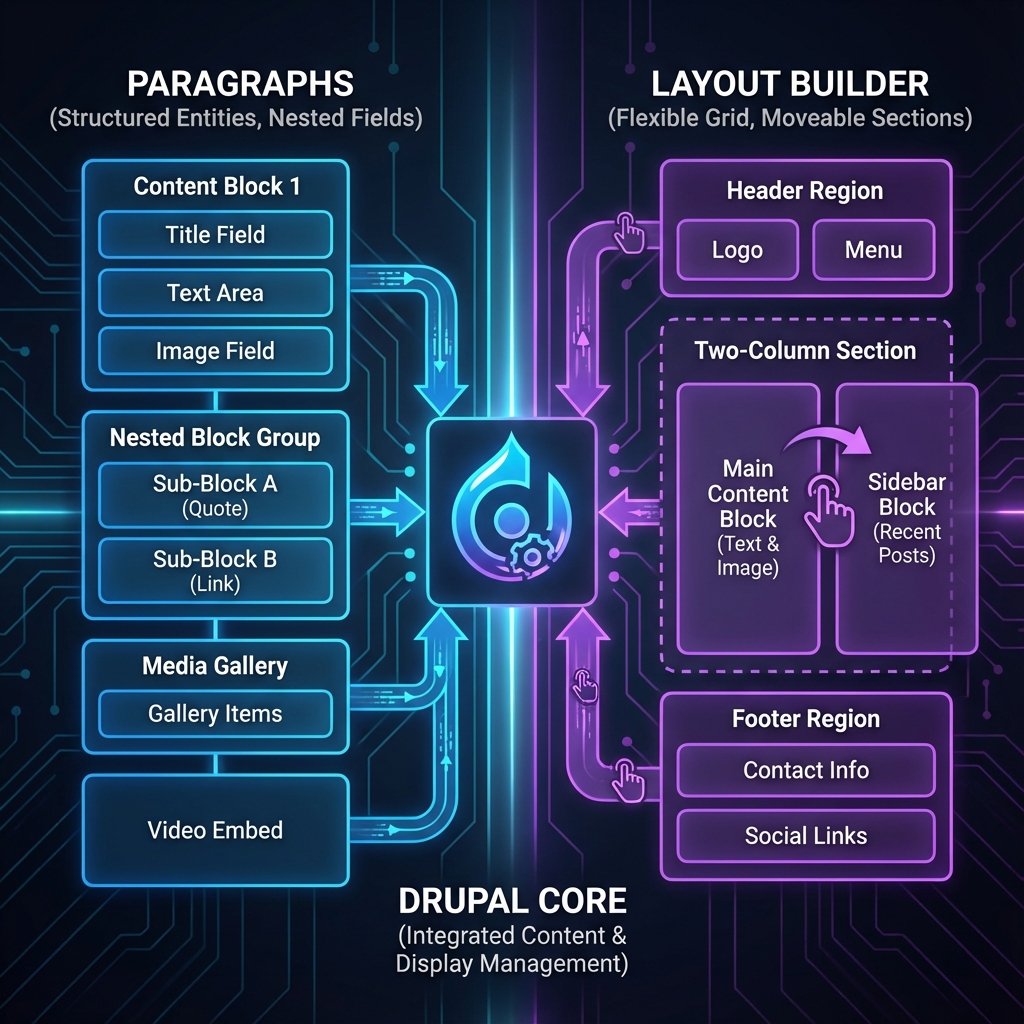
Editorial Experience: Who Wins?
Both provide drag-and-drop component-based editing. But the experiences differ dramatically.
Paragraphs: The Form-Based Approach
Editors work with structured forms:
┌─────────────────────────────────────┐
│ Hero Banner                    [×] │
├─────────────────────────────────────┤
│ Headline: [___________________]     │
│ Image:    [Upload]                  │
│ CTA Text: [___________________]     │
│ CTA Link: [___________________]     │
└─────────────────────────────────────┘
│ + Add Paragraph ▼                   │
│   ├── Hero Banner                   │
│   ├── Text with Image               │
│   ├── Accordion                     │
│   └── ... 25 more types             │
└─────────────────────────────────────┘
Pros:
- Crystal-clear field expectations
- Validation at the field level
- Impossible to break the design
- Consistent content structure
Cons:
- No preview of final layout
- Can feel “form-heavy” for simple changes
- Reordering requires drag-drop within a list
- Column layouts require complex paragraph types
Layout Builder: The Visual Approach
Editors work with visual preview:
┌─────────────────────────────────────┐
│ [+ Add Section]                     │
├─────────────────────────────────────┤
│ ┌─────────────────────────────────┐ │
│ │ Hero Banner          [⚙️] [×]   │ │
│ │ ┌───────────────────────────┐   │ │
│ │ │  Welcome to Our Site      │   │ │
│ │ │  [Image Preview]          │   │ │
│ │ │  [Learn More →]           │   │ │
│ │ └───────────────────────────┘   │ │
│ └─────────────────────────────────┘ │
│ [+ Add Block]                       │
└─────────────────────────────────────┘
Pros:
- True WYSIWYG experience
- Intuitive section/column layouts
- Visual drag-and-drop positioning
- In-context editing
Cons:
- Easier to create inconsistent layouts
- “Blank canvas syndrome” for some editors
- More power = more ways to mess up
- Accessibility oversight if not careful
The Verdict: It Depends on Your Editors
| Editor Type | Better Choice |
|---|---|
| Content authors (writers, journalists) | Paragraphs |
| Marketing team (landing pages, campaigns) | Layout Builder |
| Technical editors with design sense | Layout Builder |
| Large team with varying skill levels | Paragraphs (safer) |
| Small team, high trust | Layout Builder (flexible) |
The Headless/Decoupled Question
This is where the architectural difference becomes critical.
Paragraphs: Built for Decoupling
Paragraphs data is structured and portable. Each paragraph type maps cleanly to a JSON API response or GraphQL type:
{
  "type": "node--article",
  "attributes": {
    "title": "My Article"
  },
  "relationships": {
    "paragraphs": {
      "data": [
        {
          "type": "paragraph--hero_banner",
          "attributes": {
            "headline": "Welcome",
            "cta_text": "Learn More",
            "cta_link": "/about"
          },
          "relationships": {
            "image": { "data": { "type": "file--file", "id": "..." } }
          }
        },
        {
          "type": "paragraph--text_with_image",
          "attributes": {
            "body": "<p>Content here...</p>",
            "image_position": "left"
          }
        }
      ]
    }
  }
}
Your React/Vue/Next.js frontend receives strongly typed component data. Each paragraph type maps to a frontend component:
// Frontend component mapping
const componentMap = {
  'paragraph--hero_banner': HeroBanner,
  'paragraph--text_with_image': TextWithImage,
  'paragraph--accordion': Accordion,
  // ...
};

// Render paragraphs
{paragraphs.map(p => {
  const Component = componentMap[p.type];
  return <Component key={p.id} data={p.attributes} />;
})}
Clean. Predictable. Type-safe.
Layout Builder: Headless Nightmare
Layout Builder’s data structure was designed for Drupal’s rendering system, not API consumption:
{
  "layout_builder__layout": [
    {
      "section": {
        "layout_id": "layout_onecol",
        "components": {
          "some-uuid": {
            "configuration": {
              "id": "inline_block:hero",
              "block_serialized": "...base64 encoded..."
            },
            "region": "content",
            "weight": 0
          }
        }
      }
    }
  ]
}
To consume this in a frontend, you need to:
- Decode the serialized block data
- Understand Drupal’s layout plugin system
- Map regions and weights to frontend concepts
- Handle block types you’ve never seen before
It’s possible with modules like Layout Builder Block Serializer, but it’s fighting the architecture.
The Verdict: Decoupled = Paragraphs
| Architecture | Paragraphs | Layout Builder |
|---|---|---|
| Coupled (Drupal themes) | ✓ Great | ✓ Great |
| Progressively decoupled | ✓ Great | ✓ Possible |
| Fully headless | ✓ Great | ✗ Problematic |
| Static site generation | ✓ Great | ⚠️ Complex |
If you’re going headless, use Paragraphs. Full stop.
Performance Implications
Both systems have performance characteristics that aren’t obvious at first.
Paragraphs Performance
Loading:
- Each paragraph is a separate entity
- N+1 query risk if not careful
- Eager loading essential
// Bad: Loads paragraphs one by one
$node = Node::load($nid);
foreach ($node->field_paragraphs as $item) {
  $paragraph = $item->entity; // Separate query each time
}

// Good: Single query with entity_reference_revisions
$node = Node::load($nid);
// Paragraphs are already loaded via the field handler
Caching:
- Each paragraph has its own cache tags
- Granular invalidation possible
- Complex pages = many cache tags (can hit header limits)
Memory:
- Heavy pages can load many paragraph entities
- Consider pagination for long-form content
Layout Builder Performance
Loading:
- Layout data stored with the entity
- Blocks may trigger additional queries
- Inline blocks are relatively efficient
Caching:
- Section-level caching with Block Cache
- Can be more aggressive than Paragraphs
- But: harder to invalidate surgically
Memory:
- Layout rendering is memory-intensive
- Complex layouts with many blocks = heavy render
Performance Optimization Tips
For Paragraphs:
// Use a view mode with minimal fields
$build = $entity->get('field_paragraphs')->view('minimal');

// Or load only specific paragraph types
$paragraphs = $node->get('field_paragraphs')
  ->referencedEntities();
$heroes = array_filter($paragraphs, fn($p) =>
  $p->bundle() === 'hero_banner'
);
For Layout Builder:
// Use Lazy Builder for heavy blocks
$build['expensive_block'] = [
  '#lazy_builder' => [
    'mymodule.lazy_builder:expensiveBlock',
    [$node_id],
  ],
  '#create_placeholder' => TRUE,
];
The Verdict: Roughly Equal
Neither system has a significant performance advantage when properly optimized. The devil is in the implementation details.
The Hybrid Approach: Best of Both Worlds?
Here’s the secret that senior Drupal architects know: you can use both.
Pattern 1: Layout Builder for Structure, Paragraphs for Content
Use Layout Builder to define the page layout (hero, sidebar, main content, footer CTA), but use Paragraphs for structured content within sections:
Landing Page (Layout Builder)
├── Section: Hero (full-width)
│   └── Block: Dynamic Hero (from node fields)
├── Section: Main Content (two-column)
│   ├── Region: Primary
│   │   └── Block: Paragraphs Field Display
│   │       └── [User adds paragraphs normally]
│   └── Region: Sidebar
│       └── Block: Related Products View
└── Section: Footer CTA (full-width)
    └── Block: Inline Block (Call to Action)
Editors can:
- Rearrange major sections (Layout Builder)
- Add structured content in the main area (Paragraphs)
- Get visual layout control AND structured data
Pattern 2: Content Type Specialization
Different content types, different approaches:
| Content Type | Approach | Rationale |
|---|---|---|
| Blog Posts | Paragraphs | Structured, syndicated, headless |
| Landing Pages | Layout Builder | Visual flexibility, marketing needs |
| Product Pages | Paragraphs | API consumption, structured specs |
| Campaign Pages | Layout Builder | One-off designs, time-sensitive |
| Documentation | Paragraphs | Versioned, structured, searchable |
Pattern 3: Editorial Guardrails
Use Layout Builder’s per-bundle configuration to limit chaos:
// In mymodule.module
function mymodule_form_layout_builder_configure_block_alter(&$form, $form_state) {
  $user = \Drupal::currentUser();

  // Only admins can add certain block types
  if (!$user->hasPermission('administer site configuration')) {
    unset($form['settings']['block_form']['field_advanced_settings']);
  }
}
Or use Layout Builder Restrictions module to limit available blocks/layouts per content type.
The Decision Framework: 8 Key Questions

Answer these questions to make the right choice:
1. Will this content be consumed via API?
- Yes → Paragraphs (structured data is essential)
- No → Continue to question 2
2. Do editors need visual layout control?
- Yes, extensively → Layout Builder
- Some flexibility → Hybrid or Paragraphs with Layout Paragraphs
- No, just content entry → Continue to question 3
3. Is content consistency critical?
- Yes → Paragraphs (enforced structure)
- No → Layout Builder (creative freedom)
4. How complex are your layouts?
- Simple (mostly linear) → Paragraphs
- Complex (multi-column, varied) → Layout Builder or Hybrid
5. How many editors, how much training?
- Many editors, minimal training → Paragraphs (harder to break)
- Few editors, design-savvy → Layout Builder
6. Will content be reused across channels?
- Yes → Paragraphs (portable structured data)
- No → Either works
7. What’s your frontend architecture?
- React/Vue/Headless → Paragraphs (API-friendly)
- Drupal themes → Either works
- Both → Paragraphs (single source of truth)
8. Are you migrating existing content?
- Yes → Paragraphs (migration tools are more mature)
- No → Either works
Scoring:
- 6+ answers favor Paragraphs → Use Paragraphs
- 6+ answers favor Layout Builder → Use Layout Builder
- Mixed results → Consider Hybrid approach
Enterprise Patterns That Scale
From real projects handling millions of content items:
Pattern: Component Registry
Create a central registry of all available components, regardless of implementation:
// ComponentRegistry service
class ComponentRegistry {

  public function getAvailable(): array {
    return [
      'hero_banner' => [
        'label' => 'Hero Banner',
        'paragraph_type' => 'hero_banner',
        'layout_builder_block' => 'inline_block:hero_banner',
        'schema' => HeroBannerSchema::class,
        'preview' => '/admin/components/preview/hero_banner',
      ],
      // ... more components
    ];
  }
}
This enables:
- Consistent component inventory
- Schema validation regardless of storage
- Unified preview system
- Easy migration between approaches
Pattern: Schema Validation
Validate content regardless of how it’s stored:
# config/schema/components.schema.yml
component.hero_banner:
  type: mapping
  mapping:
    headline:
      type: string
      constraints:
        - NotBlank: ~
        - Length: { max: 100 }
    image:
      type: entity_reference
      target_type: media
      constraints:
        - NotBlank: ~
    cta:
      type: mapping
      mapping:
        text:
          type: string
        url:
          type: uri
Pattern: API Normalization Layer
If using both systems, create a normalization layer for API consumers:
class ContentNormalizer {

  public function normalize(NodeInterface $node): array {
    $components = [];

    // From Paragraphs
    if ($node->hasField('field_paragraphs')) {
      foreach ($node->field_paragraphs as $item) {
        $components[] = $this->normalizeParagraph($item->entity);
      }
    }

    // From Layout Builder
    if ($node->hasField('layout_builder__layout')) {
      foreach ($this->extractLayoutComponents($node) as $block) {
        $components[] = $this->normalizeBlock($block);
      }
    }

    return ['components' => $components];
  }
}
Future Considerations: Drupal 11 and Beyond
The landscape is evolving:
Experience Builder (XB)
Drupal’s upcoming Experience Builder aims to replace Layout Builder with a more modern, React-based editing experience. Key differences:
- Components instead of blocks
- Better mobile editing
- Improved preview performance
Impact: Layout Builder investments may need migration. Paragraphs will likely integrate as component sources.
Single Directory Components
SDC (now in core) provides a standardized component structure that works with both systems:
/components
  /hero-banner
    hero-banner.component.yml
    hero-banner.twig
    hero-banner.css
    hero-banner.js
Both Paragraphs and Layout Builder can render SDC components, enabling:
- Unified component library
- Easier designers → developers handoff
- Potential easier switching between approaches
My Recommendation for New Projects (2025)
For new projects starting today:
- Headless/Decoupled: Paragraphs, no question
- Marketing-heavy, Drupal-only: Layout Builder with guardrails
- Enterprise with mixed needs: Hybrid approach with clear guidelines
- Uncertain future: Paragraphs (more portable, easier to evolve)
Real-World Decision Matrix
Here’s how I’ve architected recent projects:
| Project | Choice | Key Factors |
|---|---|---|
| Media Publisher | Paragraphs | Headless, structured articles, syndication |
| E-commerce | Paragraphs | Product data, API consumption, PIM integration |
| Corporate Marketing | Layout Builder | Campaign pages, visual flexibility, time-to-market |
| Government Portal | Paragraphs | Accessibility requirements, strict templates |
| SaaS Marketing Site | Hybrid | Marketing pages (LB) + Documentation (Paragraphs) |
| Higher Education | Paragraphs | Multi-site, content sharing, accessibility |
The Final Word
Here’s the truth that the “it depends” crowd won’t tell you:
Paragraphs is the safer, more future-proof choice for most projects.
Layout Builder excels in specific scenarios—visual marketing pages with design-savvy editors—but introduces complexity and constraints that many teams underestimate.
If you’re unsure, start with Paragraphs. It’s easier to add Layout Builder later (for specific content types) than to migrate away from Layout Builder once you’ve committed.
The best architecture isn’t the most powerful one. It’s the one that matches your team’s capabilities, your content model, and your long-term roadmap.
Choose wisely. Your future self will thank you.
Debating content architecture for your next Drupal project? I’ve helped dozens of teams make this decision. Connect with me on LinkedIn or drop a comment below—I’m always happy to talk content strategy.