
What if I told you that the certification you’re terrified of failing has a systematic, repeatable path to success that most developers never discover?
Every year, thousands of developers stare at the Acquia Drupal Certification registration page. They hover over the “Register Now” button. And then… they close the tab.
“Maybe next quarter.” “I need more experience first.” “What if I fail and everyone finds out?”
I know this because I was that developer.
And I’m writing this guide because I wish someone had told me: the exam isn’t testing if you’re a genius. It’s testing if you prepared correctly.
Today, I’m giving you everything — the exact breakdown, the study schedule, the psychological strategies, and the resources that separate those who pass from those who don’t.
This is the guide I needed. Now it’s yours.
The Question You’re Really Asking
Let me address the elephant in the room before we dive into preparation:
Is Acquia Drupal Certification Actually Worth It?
Here are the numbers nobody talks about:
| Factor | The Reality |
|---|---|
| Certification Cost | $350 USD |
| Average Salary Boost | 15-25% (based on surveys) |
| Companies Requiring It | 40%+ of enterprise Drupal jobs |
| LinkedIn Profile Views | 2.5x increase for certified developers |
| Interview Callback Rate | 60% higher for certified candidates |
| Contract Rate Premium | $25-50/hour additional |
Let me translate that: A $350 investment can yield $15,000-40,000 in additional annual income.
But here’s what matters more than money: Certification changes how you see yourself.
When I passed, something shifted. I stopped saying “I do some Drupal work” and started saying “I’m a certified Drupal developer.” The confidence is real. The opportunities are real. The professional respect is real.
Who Should Get Certified (And Who Shouldn’t)
Get certified if:
- You have 6+ months of hands-on Drupal experience
- You want to stand out in job applications
- You’re transitioning from WordPress/Laravel to Drupal
- You want structured validation of your skills
- You’re building a Drupal-focused career
Wait on certification if:
- You’ve never built a Drupal site
- You’re completely new to PHP
- You need income immediately (study takes time)
- You’re unsure if Drupal is your path
If you’re in the “get certified” camp, let’s make this happen.
Part I: Understanding the Exam — Know Your Enemy
The number one reason developers fail isn’t lack of knowledge — it’s misunderstanding what the exam actually tests.
Exam Overview
| Specification | Details |
|---|---|
| Official Name | Acquia Certified Drupal Developer - D11 |
| Questions | 60 multiple-choice |
| Time Limit | 90 minutes |
| Passing Score | 65% (39 correct answers) |
| Format | Proctored, online or testing center |
| Cost | $350 USD |
| Retake Policy | Immediate retake allowed (additional fee) |
| Validity | Lifetime (version-specific) |
The 6 Domains: Where Points Are Won and Lost
This is critical. The exam isn’t equally weighted. Some domains are worth 6 times more than others.
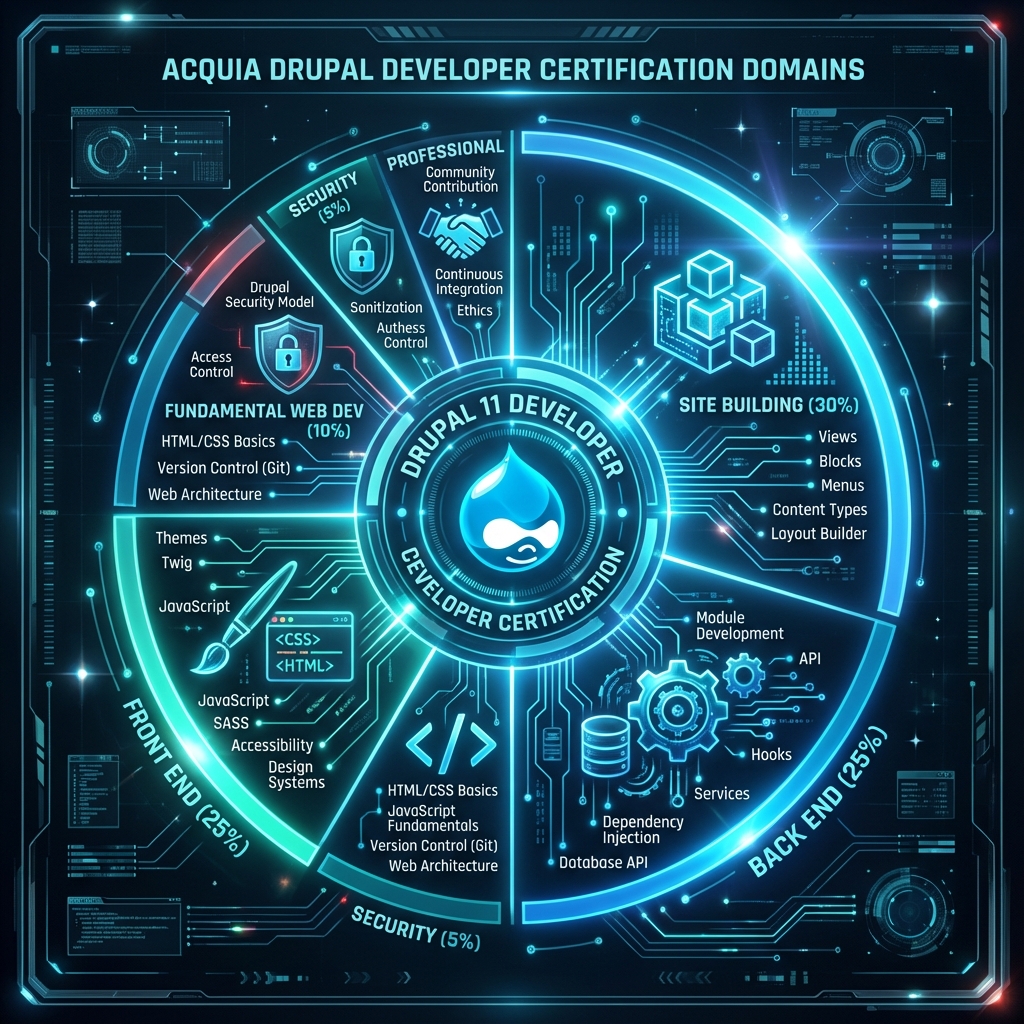
| Domain | Weight | Questions | What It Tests |
|---|---|---|---|
| 1. Fundamental Web Dev | 10% | ~6 | HTML, CSS, JS, HTTP, PHP basics |
| 2. Site Building | 30% | ~18 | Content types, fields, views, taxonomy |
| 3. Front End | 25% | ~15 | Twig, theming, preprocessing |
| 4. Back End | 25% | ~15 | Modules, hooks, services, plugins |
| 5. Security | 5% | ~3 | Access control, sanitization |
| 6. Professional | 5% | ~3 | Community, best practices |
The insight that changes everything: 80% of the exam is Site Building, Front End, and Back End.
If you master these three domains, you can pass even if you struggle elsewhere. If you neglect them, perfection in other areas won’t save you.
What Each Domain Actually Covers
Let me break down exactly what you’ll face:
Domain 1: Fundamental Web Development (10%)
The baseline check. If you’re an experienced developer, this is free points.
Topics:
- HTML5 semantic elements
- CSS selectors, specificity, layouts
- JavaScript fundamentals, DOM manipulation
- HTTP methods (GET, POST, PUT, DELETE)
- Status codes (200, 301, 404, 500)
- Basic PHP: variables, arrays, functions, OOP basics
Sample Question Format:
Which HTTP status code indicates a permanent redirect?

A) 200
B) 301
C) 302
D) 404

Answer: B
Domain 2: Site Building (30%)
This is the most important domain. 18 questions. Get these right and you’re halfway to passing.
Topics:
- Content types and fields
- Vocabularies and taxonomy
- Views (page, block, displays, relationships, contextual filters)
- Blocks and block layouts
- Menus and navigation
- Content moderation workflows
- Multilingual configuration
- Configuration management
Sample Question Format:
You need to display a list of articles filtered by the taxonomy term
in the URL. Which Views feature should you use?

A) Exposed filter
B) Relationship
C) Contextual filter
D) Sort criteria

Answer: C
Domain 3: Front End Development (25%)
The visual layer. How Drupal outputs HTML.
Topics:
- Twig syntax: variables, filters, functions
- Template inheritance and blocks
- Theme structure (.info.yml, libraries, regions)
- Template suggestions and overrides
- Preprocess functions
- Attaching CSS/JS assets
- Breakpoints and responsive images
- Render arrays
Sample Question Format:
In Twig, how do you check if a variable is not empty before rendering?

A) {% if variable %}{{ variable }}{% endif %}
B) {{ variable|default('') }}
C) {% isset variable %}{{ variable }}{% endisset %}
D) Both A and B are correct

Answer: D
Domain 4: Back End Development (25%)
Where you prove you can extend Drupal with code.
Topics:
- Module structure and files
- Routing and controllers
- Services and dependency injection
- Hooks vs events
- Plugin system (blocks, field formatters, etc.)
- Entity API
- Form API
- Configuration API
- Database API
- Caching concepts
Sample Question Format:
Which file defines a custom service in a Drupal module?

A) module.services.yml
B) module.module
C) module.info.yml
D) src/Service.php

Answer: A
# Example: mymodule.services.yml
services:
mymodule.analyzer:
class: Drupal\mymodule\Service\ContentAnalyzer
arguments: ['@entity_type.manager', '@current_user']Domain 5: Security (5%)
Only 3 questions, but don’t neglect this.
Topics:
- Permission system
- Access control
- Input sanitization (XSS prevention)
- SQL injection prevention
- CSRF protection
- Trusted host patterns
Sample Question Format:
Which function should you use to sanitize user input for display?

A) check_plain()
B) Html::escape()
C) strip_tags()
D) filter_xss()

Answer: B
Domain 6: Professional Practices (5%)
The “soft” domain. Community and best practices.
Topics:
- Drupal.org ecosystem
- Issue queue etiquette
- Coding standards (Drupal CS)
- Contributing patches
- Security advisories
Part II: The 60-Day Certification Roadmap
Now that you know what’s tested, here’s exactly how to prepare.
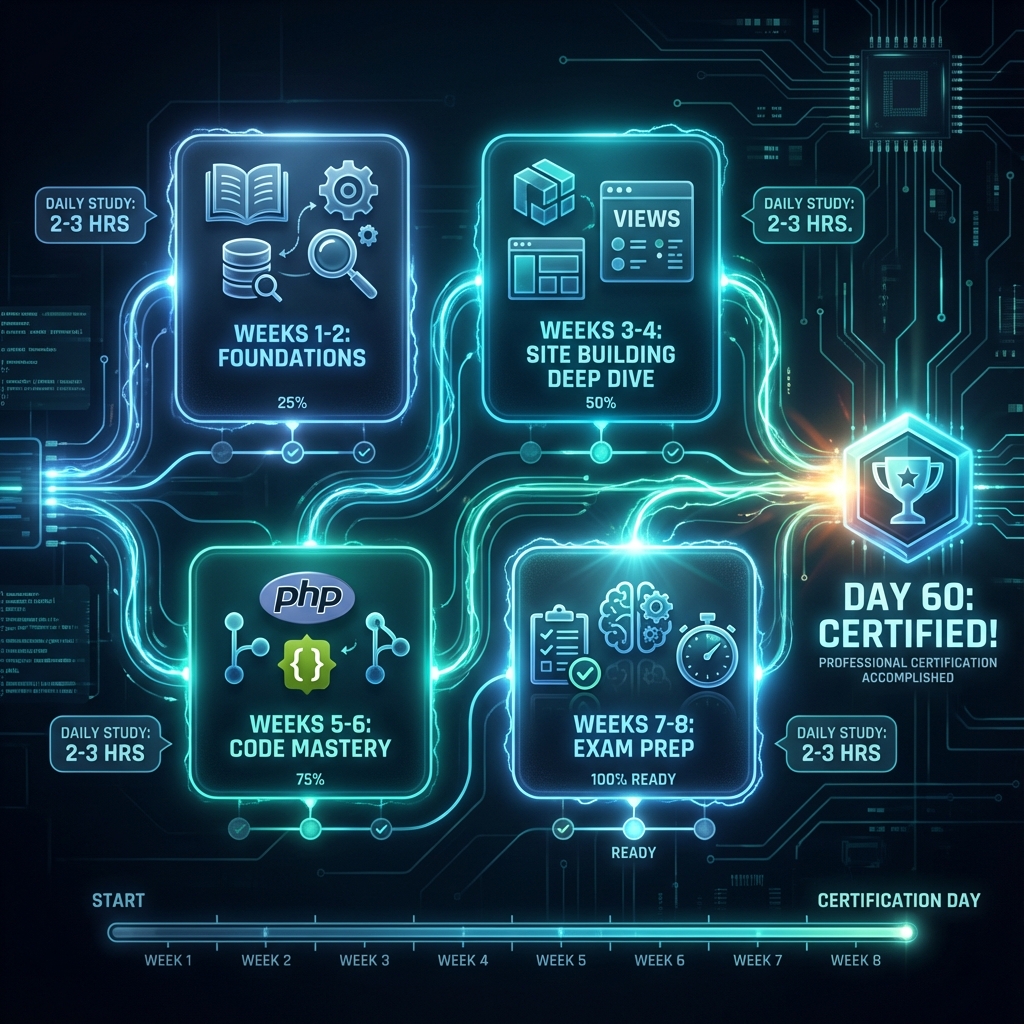
The Philosophy Behind This Schedule
This schedule assumes:
- 2-3 hours of study per day
- You have basic Drupal exposure
- You’re working/have other commitments
If you can dedicate more time, compress accordingly. If less, extend to 90 days.
Weeks 1-2: Foundation Building
Goal: Ensure your fundamentals are rock solid.
| Day | Focus | Activities |
|---|---|---|
| 1-2 | Web Fundamentals | Review HTML5, CSS, JS basics |
| 3-4 | PHP Deep Dive | OOP, namespaces, autoloading |
| 5-7 | Drupal Architecture | Study core systems, entity types |
| 8-10 | Config Management | Practice config export/import |
| 11-14 | Drupal Core Concepts | Study the API documentation |
End of Week 2 Milestone: You should be able to explain Drupal’s entity system, the difference between config and content, and the role of Composer.
Weeks 3-4: Site Building Deep Dive
Goal: Master Domain 2 — the highest-weighted domain.
| Day | Focus | Activities |
|---|---|---|
| 15-17 | Content Types | Create 5+ content types with fields |
| 18-20 | Taxonomy | Build hierarchical vocabularies, term references |
| 21-24 | Views Mastery | Build 10+ views with relationships, filters |
| 25-28 | Blocks & Layouts | Configure Layout Builder, custom blocks |
Practice Project: Build a job board site with:
- Job listing content type
- Company profiles
- Category taxonomy
- Location taxonomy
- View: Jobs filtered by category and location
- View: Company profile with related jobs
Weeks 5-6: Code Mastery (Front End + Back End)
Goal: Master Domains 3 and 4.
| Day | Focus | Activities |
|---|---|---|
| 29-31 | Theme Structure | Create custom theme from scratch |
| 32-34 | Twig Deep Dive | Template overrides, suggestions |
| 35-38 | Module Basics | Create module with routing, controller |
| 39-42 | Services & Plugins | Build custom service, block plugin |
Practice Project: Build a custom module that:
/**
 * Requirements:
 * - Custom route returning JSON
 * - Service using dependency injection
 * - Custom block plugin
 * - Configuration form
 * - Integration with Views
 */
Example Module Structure:
my_certification_module/
├── my_certification_module.info.yml
├── my_certification_module.routing.yml
├── my_certification_module.services.yml
├── my_certification_module.module
├── config/
│   └── install/
│       └── my_certification_module.settings.yml
├── src/
│   ├── Controller/
│   │   └── ExampleController.php
│   ├── Plugin/
│   │   └── Block/
│   │       └── ExampleBlock.php
│   ├── Form/
│   │   └── SettingsForm.php
│   └── Service/
│       └── DataService.php
└── templates/
    └── example-output.html.twig
Weeks 7-8: Exam Preparation
Goal: Practice, refine, build confidence.
| Day | Focus | Activities |
|---|---|---|
| 43-46 | Practice Exams | Take 3+ full practice tests |
| 47-50 | Weak Areas | Focus study on missed topics |
| 51-54 | Speed Drills | Timed question sets |
| 55-57 | Review All Notes | Consolidate learning |
| 58-59 | Light Review | Don’t cram, stay fresh |
| 60 | EXAM DAY | You’ve got this! |
Part III: The 7 Deadly Mistakes (And How To Avoid Them)
After seeing countless developers prepare for this exam, patterns emerge. Here’s what separates those who pass from those who fail:
Mistake #1: Studying Theory Without Practice
The Error: Reading documentation without building anything.
Why It Fails: The exam tests application, not recall. You need muscle memory.
The Fix: For every hour of reading, spend two hours building. Create a “certification sandbox” site where you practice everything.
Mistake #2: Ignoring Admin UI Knowledge
The Error: Focusing only on code, forgetting site building.
Why It Fails: 30% of the exam is site building — clicking through admin interfaces, configuring views, setting up content types.
The Fix: Spend significant time just using Drupal’s admin UI. Know where every setting lives.
Mistake #3: Memorizing Without Understanding
The Error: Memorizing function names without understanding when to use them.
Why It Fails: The exam gives scenarios. You need to solve problems, not recite definitions.
The Fix: For each concept, ask: “When would I use this? What problem does it solve? What’s the alternative?”
Mistake #4: Neglecting Twig
The Error: Underestimating the front-end domain.
Why It Fails: 25% of the exam is front end. Twig fluency is non-negotiable.
The Fix: Build at least one complete theme. Override every major template type. Master debug mode.
{# Enable Twig debugging in services.yml #}
parameters:
  twig.config:
    debug: true
    cache: false
Mistake #5: Poor Time Management on Exam Day
The Error: Spending too long on hard questions, running out of time.
Why It Fails: If you spend 3 minutes on 10 questions, you’ve burned 30 minutes and only answered 10.
The Fix: Practice with 90-second-per-question drills. Flag difficult questions and return later.
Mistake #6: Not Taking Practice Exams
The Error: Studying content but never simulating the exam.
Why It Fails: The exam environment creates pressure. Questions are worded specifically. You need practice.
The Fix: Take at least 3 full-length practice exams under timed conditions. Analyze every wrong answer.
Mistake #7: Cramming the Night Before
The Error: Panic studying 24 hours before the exam.
Why It Fails: Exhaustion hurts performance more than any last-minute knowledge helps.
The Fix: Day before the exam: light review only. Good sleep. Calm mind.
Part IV: Test-Taking Strategies That Actually Work
Beyond content knowledge, there’s a meta-game to certification exams.
Strategy 1: The Two-Pass Method
Pass 1: Answer every question you’re confident about. Skip anything that makes you hesitate. Flag it and move on.
Pass 2: Return to flagged questions with fresh eyes. You’ll often realize the answer after your subconscious has processed it.
Why It Works: Reduces pressure, prevents time panic, and allows pattern recognition across questions.
Strategy 2: Elimination Before Selection
Never look at answers and try to guess the right one. Instead:
- Read the question carefully
- Form your own answer BEFORE looking at options
- Eliminate obviously wrong answers
- Compare remaining options to your mental answer
This prevents “trap” answers from fooling you.
Strategy 3: Watch for Absolute Language
Be suspicious of answers containing:
- “Always”
- “Never”
- “Only”
- “Must”
- “All”
Drupal is flexible. Absolutes are usually wrong.
Example:
Q: When should you use hook_form_alter()?

A) Always when modifying any form ← Too absolute
B) Only for core forms ← Too restrictive
C) When you need to modify form elements or behavior ← Correct
D) Never, you should use events instead ← Too absolute
Strategy 4: Context Is Everything
Many questions test the same concept but ask for different contexts:
- “In a module, you would…”
- “In a theme, you would…”
- “In a controller, you would…”
Pay attention to the context. The correct answer for a module might be wrong for a theme.
Strategy 5: Trust Your Preparation
If you’ve followed this guide, you’re prepared. Don’t second-guess yourself. Your first instinct is usually correct.
Studies show that changing answers usually decreases scores — unless you have a specific reason for the change.
Part V: Practice Question Examples
Here are realistic questions in the style of the actual exam. Test yourself:
Question 1 (Site Building)
You need to create a view that shows articles related to the
currently viewed article, based on shared taxonomy terms.
What's the most efficient approach?

A) Use a contextual filter with "Content: Has taxonomy term ID"
B) Create a custom module with queries
C) Use jQuery to fetch related content
D) Add a View relationship and filter

Answer: A
Explanation: Contextual filters allow views to use current page
context (like the taxonomy terms of the current node) to filter results.
Question 2 (Theming)
In Twig, you want to add a class to a render element only if a
condition is true. Which syntax is correct?

A) <div class="{{ condition ? 'active' : '' }}">
B) <div class="{% if condition %}active{% endif %}">
C) <div{{ attributes.addClass(condition ? 'active') }}>
D) All of the above can work

Answer: D
Explanation: Multiple approaches are valid. Option C is preferred
in Drupal themes as it properly uses the attributes object.
Question 3 (Back End)
Where do you define a service's dependencies in Drupal?

A) In the service class constructor
B) In the .services.yml file under 'arguments'
C) In the .module file using a factory
D) Both A and B are required

Answer: D
Explanation: You must declare dependencies in the .services.yml file
(arguments key) AND receive them in the constructor.
Question 4 (Security)
What is the correct way to output user-submitted content safely in Twig?

A) {{ raw_input }}
B) {{ raw_input|raw }}
C) {{ raw_input|escape }}
D) {{ raw_input|striptags }}

Answer: C (or just {{ raw_input }} since Twig auto-escapes)
Explanation: Twig auto-escapes by default. The |escape filter
explicitly ensures HTML entity encoding to prevent XSS.
Question 5 (Module Development)
Which hook should you implement to add items to an existing form?

A) hook_form_build()
B) hook_form_alter()
C) hook_form_add()
D) hook_form_submit()

Answer: B
Explanation: hook_form_alter() allows modification of any form,
including adding, removing, or modifying form elements.
Part VI: The Ultimate Resource List
Everything you need, curated and organized:
Official Resources
| Resource | URL | Notes |
|---|---|---|
| Acquia Certification Hub | acquia.com/certification | Registration, study guides |
| Official Exam Guide | acquia.com/customer-success/learning-services | Domain breakdowns |
| Drupal.org Docs | drupal.org/docs | Primary reference |
Courses and Training
| Resource | Type | Cost | Best For |
|---|---|---|---|
| Drupalize.Me | Videos | $45/mo | Comprehensive learning |
| Acquia Academy | Videos | Free | Official prep courses |
| Debug Academy | Bootcamp | $3500 | Intense preparation |
| Udemy Drupal Courses | Videos | $15-50 | Budget learners |
Practice Exams
| Resource | Questions | Notes |
|---|---|---|
| Acquia Sample Questions | 20 | Free, official |
| Webwash Practice Tests | 100+ | Highly recommended |
| CertLibrary | 150+ | Comprehensive |
Books
| Title | Author | Focus |
|---|---|---|
| Drupal 10 Module Development | Daniel Sipos | Back end |
| Twig for Drupal | Drupal.org | Theming |
| Enterprise Drupal 10 Development | Todd Tomlinson | Architecture |
Communities
| Platform | Link |
|---|---|
| Drupal Slack | drupal.org/slack |
| r/drupal | reddit.com/r/drupal |
| Drupal Answers | drupal.stackexchange.com |
| Twitter/X #drupal | Active community |
Part VII: Exam Day — The Final Countdown
The Week Before
- Confirm exam registration
- Test webcam and microphone (if online)
- Prepare ID documents
- Light review only — no cramming
- Sleep 7-8 hours each night
- Reduce caffeine to normal levels
The Night Before
- Lay out ID and exam confirmation
- Clear your exam space
- No alcohol
- No late-night studying
- Set two alarms
- Sleep early
Exam Morning
- Light breakfast (brain fuel, not food coma)
- Normal caffeine (not extra)
- Arrive 15 minutes early
- Use the bathroom
- Deep breaths
During the Exam
- First 5 minutes: Read instructions, get comfortable
- Minutes 5-60: First pass — answer confident questions
- Minutes 60-85: Second pass — tackle flagged questions
- Minutes 85-90: Final review — check for unanswered
After the Exam
- You’ll see your result immediately
- If you pass: Celebrate! You earned it.
- If you don’t: It’s data, not defeat. Note weak areas and try again.
The Moment of Truth
Let me tell you what happens when you pass.
You’ll see “Congratulations” on your screen. For a moment, you won’t believe it. You’ll screenshot it. You’ll probably tell someone immediately. Your heart will be pounding.
Then, slowly, it sinks in: You did it.
Not because you’re the smartest developer in the room. Not because you got lucky. But because you followed a system. You put in the work. You prepared correctly.
That certification isn’t just a badge. It’s proof — to employers, to clients, and most importantly, to yourself — that you can master difficult things when you commit to them.
Your Next Move
You’ve read this entire guide. You know more about Acquia certification than 90% of developers who attempt it.
But knowledge without action is worthless.
Here’s your challenge:
- Today: Bookmark this guide
- Tomorrow: Register for the exam (60 days out)
- This week: Set up your study environment
- Next 8 weeks: Follow the roadmap
The exam isn’t going anywhere. But neither is your current skill level unless you take action.
You have everything you need. The question is: Will you use it?
Did this guide remove your fear of certification? Did something finally click? Share this with a developer who’s been putting off their certification — they’ll thank you.
And when you pass — and you will — come back and leave a comment. Your success story becomes part of the next developer’s motivation.
You’ve got this. Now go prove it.
🎯 Ready to Test Your Knowledge?
I’ve built something special for you: Free mock exams that replicate the real Acquia certification experience.
Drupal Certification Mock Exams
180 practice questions across 3 difficulty levels
90-minute timer • 65% passing score • Domain breakdown
- 🌱 Beginner — Foundation concepts
- ⚡ Intermediate — Applied knowledge
- 🔥 Expert — Advanced scenarios
Start Practice Exam →
No signup required. Just practice.