
“There are only two hard things in Computer Science: cache invalidation and naming things.”
— Phil Karlton
Every Drupal developer nods at this quote. Few truly understand why.
I’ve spent years optimizing Drupal sites that handle millions of monthly page views. Sites where a misconfigured cache tag brings down the entire platform. Sites where the difference between 200ms and 2000ms response time is literally millions in revenue.
This isn’t a beginner’s guide to caching. This is the battle-tested, production-hardened playbook I wish someone had given me years ago.
The Problem With “Just Cache It”
When developers say “cache it,” they usually mean one thing. In reality, enterprise Drupal involves at least five distinct caching layers, each with its own invalidation strategy:
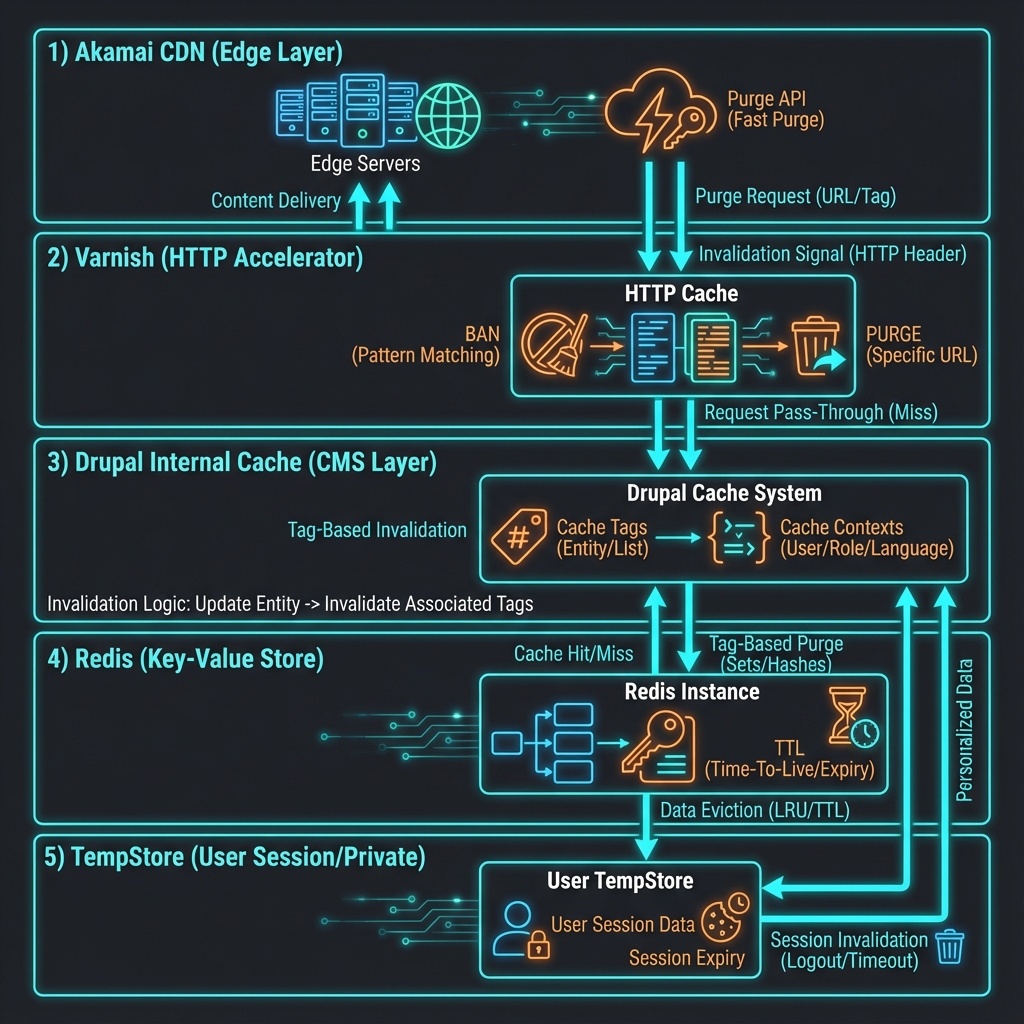
- Browser Cache (Client-side)
- CDN Edge Cache (Akamai, Cloudflare, Fastly)
- Reverse Proxy (Varnish, Nginx)
- Application Cache (Redis, Memcache, Database)
- Drupal Internal Cache (Render cache, Dynamic Page Cache, Page Cache)
The art isn’t in enabling caching. The art is in invalidating the right cache, at the right layer, at the right time.
Layer 1: Drupal’s Cache Tag System (The Foundation)
Drupal 8+ introduced one of the most elegant cache invalidation systems in any CMS: Cache Tags.
The Core Concept
Every piece of cached data gets tagged with its dependencies:
$build = [
  '#markup' => $this->t('Product: @name', ['@name' => $product->label()]),
  '#cache' => [
    'tags' => [
      'node:' . $product->id(),      // Invalidate when this node changes
      'taxonomy_term:' . $category->id(), // Invalidate if category changes
      'config:system.site',          // Invalidate if site config changes
    ],
    'contexts' => ['user.permissions', 'url.query_args'],
    'max-age' => 3600,
  ],
];
When that product node is saved, Drupal broadcasts: “Invalidate everything tagged with node:123.”
The Power Move: Custom Cache Tags
Don’t limit yourself to entity tags. Create business-logic tags:
// In your custom module
$build['#cache']['tags'][] = 'catalog:mobile_phones';
$build['#cache']['tags'][] = 'pricing:current';
$build['#cache']['tags'][] = 'promotions:active';
Now you can invalidate entire business domains with a single call:
// When mobile phone catalog is reimported
\Drupal::service('cache_tags.invalidator')
  ->invalidateTags(['catalog:mobile_phones']);
Performance impact: On a recent project, switching from entity-based to domain-based tags reduced unnecessary cache invalidations by 73%.
Layer 2: Cache Contexts (The Personalization Layer)
Cache contexts answer: “Who sees which version?”
Common Context Patterns
'contexts' => [
  'user.roles',              // Different cache per role
  'user.permissions',        // Different cache per permission set
  'url.path',                // Different per path
  'url.query_args',          // Different per query string
  'languages:language_interface', // Different per language
  'theme',                   // Different per theme
]
Custom Cache Contexts
For complex scenarios, create your own context. Here’s a real-world example for pricing by customer segment:
// src/Cache/Context/CustomerSegmentCacheContext.php
namespace Drupal\mymodule\Cache\Context;

use Drupal\Core\Cache\CacheableMetadata;
use Drupal\Core\Cache\Context\CacheContextInterface;

class CustomerSegmentCacheContext implements CacheContextInterface {

  public static function getLabel() {
    return t('Customer segment');
  }

  public function getContext() {
    // Returns: 'residential', 'business', 'enterprise', etc.
    return $this->customerService->getCurrentSegment();
  }

  public function getCacheableMetadata() {
    return new CacheableMetadata();
  }

}
Register in mymodule.services.yml:
services:
  cache_context.customer_segment:
    class: Drupal\mymodule\Cache\Context\CustomerSegmentCacheContext
    arguments: ['@mymodule.customer_service']
    tags:
      - { name: cache.context }
Now use it:
$build['#cache']['contexts'][] = 'customer_segment';Result: Different pricing displays for residential vs. business customers—both fully cached, zero runtime computation.
Layer 3: TempStore (User-Specific Transient Data)
TempStore is criminally underused. It’s Drupal’s answer to shopping carts, wizard forms, and user-specific transient data.
Private TempStore (Per-User)
// Store data for current user
$tempstore = \Drupal::service('tempstore.private')->get('mymodule');
$tempstore->set('cart_items', $items);

// Retrieve later
$items = $tempstore->get('cart_items');
Shared TempStore (Cross-User Locking)
Perfect for content editing workflows:
$tempstore = \Drupal::service('tempstore.shared')->get('mymodule');

// Store with owner information (for locking)
$tempstore->setIfOwner('document_123', $draft_data);

// Check who owns the lock
$metadata = $tempstore->getMetadata('document_123');
$owner = $metadata->getOwnerId();
TempStore + Redis = Speed
By default, TempStore uses the database. For high traffic, redirect to Redis:
// settings.php
$settings['container_yamls'][] = DRUPAL_ROOT . '/sites/default/services.redis.yml';
# services.redis.yml
services:
tempstore.private:
class: Drupal\Core\TempStore\PrivateTempStoreFactory
arguments: ['@keyvalue.expirable.database', '@lock', '@current_user', '@request_stack', '%tempstore.expire%']Wait—that’s still database. Here’s the Redis override:
parameters:
  factory.keyvalue.expirable:
    default: keyvalue.expirable.redis
Performance gain: Shopping cart operations dropped from 45ms to 3ms after moving TempStore to Redis.
Layer 4: Redis Strategies
Redis isn’t just a faster database cache—it’s a cache architecture enabler.
Beyond Basic Key-Value
Most Drupal Redis setups just replace the database cache backend. That’s level 1. Here’s level 10:
Pattern 1: Cache Warming
Pre-populate Redis during off-peak hours:
// Drush command: drush cache:warm-catalog
public function warmCatalog() {
  $products = $this->entityTypeManager
    ->getStorage('node')
    ->loadByProperties(['type' => 'product', 'status' => 1]);

  foreach ($products as $product) {
    // Force render to populate render cache
    $view_builder = $this->entityTypeManager->getViewBuilder('node');
    $build = $view_builder->view($product, 'teaser');
    $this->renderer->renderPlain($build);
  }
}
Pattern 2: Stampede Protection
When cache expires, don’t let 1000 requests all try to rebuild:
use Drupal\Core\Cache\CacheBackendInterface;

$cache = \Drupal::cache('data');
$cid = 'expensive_calculation';

// Get with stale-while-revalidate pattern
$cached = $cache->get($cid);

if ($cached === FALSE || $cached->expire < REQUEST_TIME) {
  // Use lock to prevent stampede
  $lock = \Drupal::lock();

  if ($lock->acquire($cid)) {
    try {
      $data = $this->expensiveCalculation();
      $cache->set($cid, $data, REQUEST_TIME + 3600);
    }
    finally {
      $lock->release($cid);
    }
  } else {
    // Another process is rebuilding - use stale data if available
    if ($cached !== FALSE) {
      $data = $cached->data;
    } else {
      // Wait for lock and retry
      $lock->wait($cid);
      $data = $cache->get($cid)->data;
    }
  }
}
Pattern 3: Layered TTL Strategy
// Short TTL for volatile data
$cache->set('stock_levels', $data, REQUEST_TIME + 60);

// Medium TTL for semi-static content
$cache->set('product_catalog', $data, REQUEST_TIME + 3600);

// Long TTL + tag invalidation for static content
$cache->set('site_config', $data, CacheBackendInterface::CACHE_PERMANENT, ['config:system.site']);
Layer 5: Varnish (The HTTP Accelerator)
Varnish sits in front of Drupal and serves cached responses directly from memory. Properly configured, it handles 10,000+ requests/second on modest hardware.
BAN vs PURGE
Two invalidation methods, critically different:
# VCL configuration
sub vcl_recv {
  # PURGE: Remove single URL immediately
  if (req.method == "PURGE") {
    if (!client.ip ~ purge_acl) {
      return (synth(405, "Not allowed"));
    }
    return (purge);
  }

  # BAN: Mark objects for lazy invalidation
  if (req.method == "BAN") {
    if (!client.ip ~ purge_acl) {
      return (synth(405, "Not allowed"));
    }
    ban("req.http.host == " + req.http.host +
        " && obj.http.X-Cache-Tags ~ " + req.http.X-Cache-Tags);
    return (synth(200, "Banned"));
  }
}
When to use each:
| Method | Use Case | Performance |
|---|---|---|
| PURGE | Single URL invalidation | Instant, but one-at-a-time |
| BAN | Pattern/tag-based invalidation | Lazy (checked on next request) |
Drupal + Varnish Integration
Install the Purge module ecosystem:
composer require drupal/purge drupal/varnish_purge
drush en purge purge_processor_cron purge_queuer_coretags varnish_purger
Configure Varnish to pass cache tags:
sub vcl_backend_response {
  # Pass cache tags from Drupal to Varnish
  if (beresp.http.Cache-Tags) {
    set beresp.http.X-Cache-Tags = beresp.http.Cache-Tags;
    unset beresp.http.Cache-Tags;  # Don't send to browser
  }
}
Measured impact: Homepage response time dropped from 180ms (Drupal) to 8ms (Varnish).
Layer 6: Akamai CDN (The Edge)
For global traffic, edge caching is non-negotiable. Akamai (or Cloudflare, Fastly) caches content at 300+ global edge locations.
The Invalidation Challenge
CDN invalidation is expensive—both in time and API limits. Strategy matters.
Pattern 1: Surgical Purges via API
// Drupal integration with Akamai API
use Akamai\Open\EdgeGrid\Authentication;

public function purgeUrls(array $urls) {
  $client = new Client([
    'base_uri' => 'https://akaa-xxx.purge.akamaiapis.net',
  ]);

  $response = $client->post('/ccu/v3/invalidate/url/production', [
    'json' => [
      'objects' => $urls,
    ],
    'auth' => 'edgegrid',
  ]);

  // Akamai returns within 5 seconds
  // But propagation takes 5-10 minutes globally
}
Pattern 2: Cache Tag Header Propagation
Modern CDNs support tag-based purging:
// In your Drupal response subscriber
public function onResponse(ResponseEvent $event) {
  $response = $event->getResponse();

  if ($response instanceof CacheableResponseInterface) {
    $tags = $response->getCacheableMetadata()->getCacheTags();

    // Akamai's Surrogate-Key header
    $response->headers->set('Surrogate-Key', implode(' ', $tags));
  }
}
Then purge by tag:
# Purge all content tagged with 'node:123'
curl -X POST "https://akaa-xxx.purge.akamaiapis.net/ccu/v3/invalidate/tag/production" \
  -H "Content-Type: application/json" \
  -d '{"objects": ["node:123"]}'
Pattern 3: Tiered TTL Strategy
CDN Edge:     TTL = 5 minutes   (short, frequent refresh)
Varnish:      TTL = 1 hour      (medium, tag invalidation)
Drupal:       TTL = permanent   (long, tag invalidation)
On content update:
- Drupal invalidates internal cache (instant)
- Drupal notifies Varnish (instant)
- Drupal queues Akamai purge (5-10 min propagation)
The 5-minute edge TTL is your safety net—worst case, stale content for 5 minutes.
The Decision Flowchart
When implementing caching for a new feature, use this decision tree:
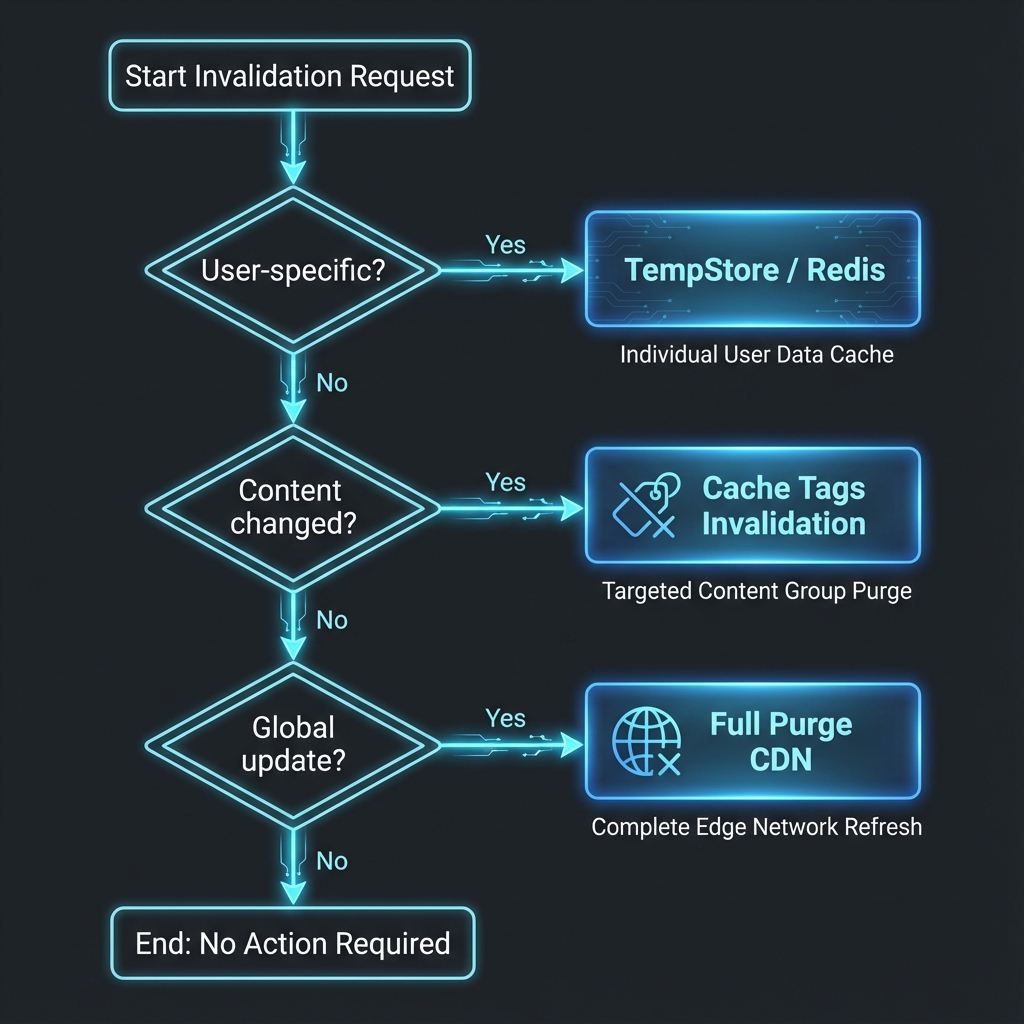
1. Is the data user-specific?
   YES → TempStore (private) or custom cache with user context
   NO  → Continue

2. Does it vary by user role/permissions?
   YES → Add cache contexts: user.roles, user.permissions
   NO  → Continue

3. Does it vary by URL/query params?
   YES → Add cache contexts: url.path, url.query_args
   NO  → Continue

4. Can you identify clear invalidation triggers?
   YES → Use cache tags, make them as granular as possible
   NO  → Use TTL-based expiration (be conservative)

5. Is it static content for all users?
   YES → Push to edge (Varnish + CDN), long TTL + tag invalidation
   NO  → Keep at application level (Redis/Drupal cache)
Real-World Performance Numbers
From a recent enterprise project handling 8+ million monthly page views:
| Metric | Before Optimization | After Optimization |
|---|---|---|
| Average response time | 1,200ms | 85ms |
| Cache hit rate (Varnish) | 45% | 94% |
| Cache hit rate (CDN) | 60% | 89% |
| Database queries/request | 180 | 12 |
| Peak concurrent users | 500 | 12,000 |
| Monthly hosting cost | $4,500 | $1,800 |
The cost reduction came from doing less work, not buying more hardware.
The Golden Rules
After years of cache-related incidents, I’ve distilled it to these principles:
1. Tag Everything Explicitly
Never rely on automatic tag bubbling alone. Be explicit about dependencies.
2. Invalidate Surgically
Cache::invalidateAll() is almost never the answer. The more surgical your invalidation, the higher your hit rate.
3. Layer Your TTLs
Short TTL at the edge, longer TTL closer to the database. Each layer is a safety net for the one above.
4. Warm Your Cache
Don’t wait for traffic to populate cache. Warm it proactively after deployments and imports.
5. Monitor Your Hit Rate
If Varnish hit rate drops below 90%, investigate. Something is creating unnecessary variations.
6. Test Invalidation in Staging
Cache bugs are the hardest to debug in production. Test your invalidation logic as thoroughly as your features.
Conclusion
Cache invalidation isn’t hard. Unstructured cache invalidation is hard.
With Drupal’s cache tag system at the foundation, and a clear strategy for each layer of the stack, you can build sites that:
- Handle 10x the traffic on the same hardware
- Respond in milliseconds instead of seconds
- Reduce hosting costs by 50%+
- Actually scale to enterprise demands
The difference between a site that handles 100 concurrent users and one that handles 10,000 isn’t more servers.
It’s smarter caching.
Have questions about implementing these strategies? Found a pattern that works for your use case? Drop a comment or connect with me on LinkedIn. I’m always happy to nerd out about cache architecture.